Knowledge Base
 Search
CreatedOct 17,2018|AuthorGamePP|Categoryhelps
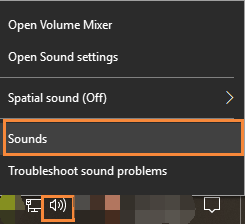
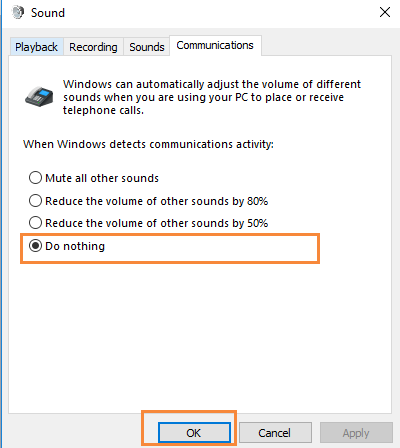
1.First close Game Plus Plus,open the sound control panel,on the communication mode,chose do nothing.Restart Game Plus Plus and start your game.
2.Select the communication module, and set Windows to detect the communication activity when it is set to do no operation, and it can be used normally when entering the game.
 How does the GamePP display the number of game frames for “PLAYERUNKNOWN’S BATTLEGROUNDS&...
 4,134
Using Game Plus Plus while playing CSGO will cause occasional problem of low FPS.
5,987
Game Plus Plus can no work properly in Forza Horizon 4.
4,265
Game Plus Plus can no work properly in Minecraft.
4,182
Sometime Game Plus Plus cannot normally start its recording feature in games.
4,453
Select to enable the desktop overlay of Game Plus Plus,but on desktop there is no information d...
4,006
Game Plus Plus cannot be enabled normally in-game.
3,484
Using Game Plus Plus’s memory release feature could lead to low FPS occasionally in-game.
3,708
Game Plus Plus may cause computer can not run normally.
3,727
How to give us feedback if you have any problem while you are using Game Plus Plus?
3,590
Game Plus Plus will lower the volu...
11,701
Using Game Plus Plus while playing...
5,987
How to open the ReShade solution?
5,559
Sometime Game Plus Plus cannot nor...
4,453
How to check the CPU temperature a...
4,374
Game Plus Plus can no work properl...
4,265
Game Plus Plus can no work properl...
4,182
How do I check the configuration a...
4,136
How does the GamePP display the nu...
4,134
How to open the GamePP power solut...
4,063
4,134
Using Game Plus Plus while playing CSGO will cause occasional problem of low FPS.
5,987
Game Plus Plus can no work properly in Forza Horizon 4.
4,265
Game Plus Plus can no work properly in Minecraft.
4,182
Sometime Game Plus Plus cannot normally start its recording feature in games.
4,453
Select to enable the desktop overlay of Game Plus Plus,but on desktop there is no information d...
4,006
Game Plus Plus cannot be enabled normally in-game.
3,484
Using Game Plus Plus’s memory release feature could lead to low FPS occasionally in-game.
3,708
Game Plus Plus may cause computer can not run normally.
3,727
How to give us feedback if you have any problem while you are using Game Plus Plus?
3,590
Game Plus Plus will lower the volu...
11,701
Using Game Plus Plus while playing...
5,987
How to open the ReShade solution?
5,559
Sometime Game Plus Plus cannot nor...
4,453
How to check the CPU temperature a...
4,374
Game Plus Plus can no work properl...
4,265
Game Plus Plus can no work properl...
4,182
How do I check the configuration a...
4,136
How does the GamePP display the nu...
4,134
How to open the GamePP power solut...
4,063

wonderinfinity Copyright 2013-2026 wonderinfinity.com All rights reserved. wonderinfinity All Rights Reserved 蜀ICP备15019947号-1