Knowledge Base
 Search
CreatedSep 26,2019|AuthorGamePP|CategoryHardware monitoring related issues
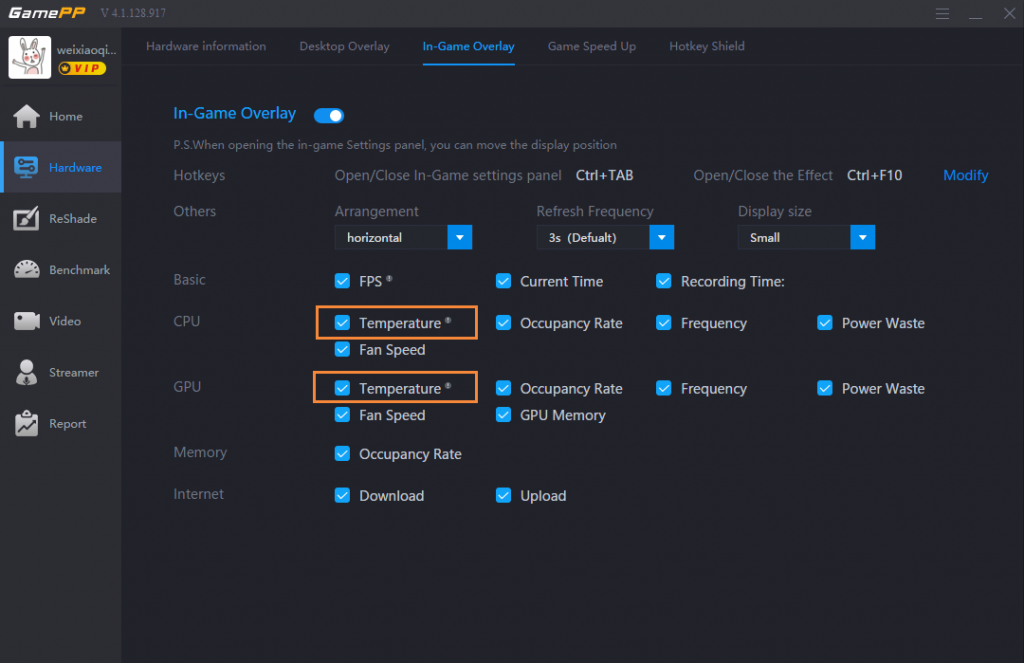
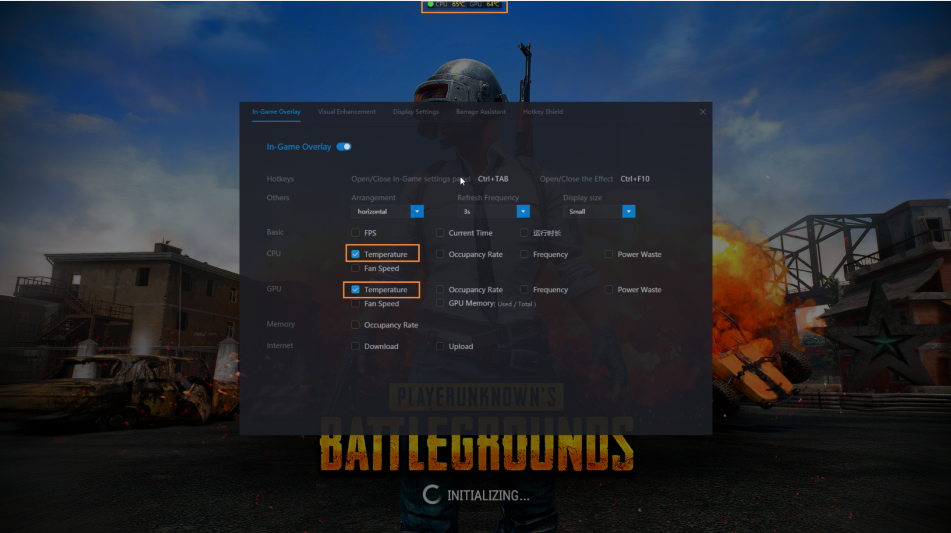
Open the GamePP, select the hardware to monitor the in-game display panel, open the in-game display switch, select the CPU temperature and GPU temperature, and then enter the game, you can view the CPU temperature and GPU temperature in the game in real time.
 How to open the GamePP power solution?
 4,002
How do I check the configuration and computer model of my computer?
4,123
How to check the CPU temperature and GPU temperature of the computer in the game?
4,349
How to check the CPU and GPU temperature on the desktop?
3,732
How do I view the hardware information of my computer?
3,055
How to lock the number of frames in the game?
3,308
How does the GamePP display the number of game frames for “PLAYERUNKNOWN’S BATTLEGROUNDS&...
4,127
Game Plus Plus will lower the volu...
11,654
Using Game Plus Plus while playing...
5,965
How to open the ReShade solution?
5,549
Sometime Game Plus Plus cannot nor...
4,435
How to check the CPU temperature a...
4,349
Game Plus Plus can no work properl...
4,256
Game Plus Plus can no work properl...
4,177
How does the GamePP display the nu...
4,127
How do I check the configuration a...
4,123
How to open the GamePP power solut...
4,002
4,002
How do I check the configuration and computer model of my computer?
4,123
How to check the CPU temperature and GPU temperature of the computer in the game?
4,349
How to check the CPU and GPU temperature on the desktop?
3,732
How do I view the hardware information of my computer?
3,055
How to lock the number of frames in the game?
3,308
How does the GamePP display the number of game frames for “PLAYERUNKNOWN’S BATTLEGROUNDS&...
4,127
Game Plus Plus will lower the volu...
11,654
Using Game Plus Plus while playing...
5,965
How to open the ReShade solution?
5,549
Sometime Game Plus Plus cannot nor...
4,435
How to check the CPU temperature a...
4,349
Game Plus Plus can no work properl...
4,256
Game Plus Plus can no work properl...
4,177
How does the GamePP display the nu...
4,127
How do I check the configuration a...
4,123
How to open the GamePP power solut...
4,002

wonderinfinity Copyright 2013-2026 wonderinfinity.com All rights reserved. wonderinfinity All Rights Reserved 蜀ICP备15019947号-1