Knowledge Base
 Search
CreatedSep 26,2019|AuthorGamePP|CategoryHardware monitoring related issues
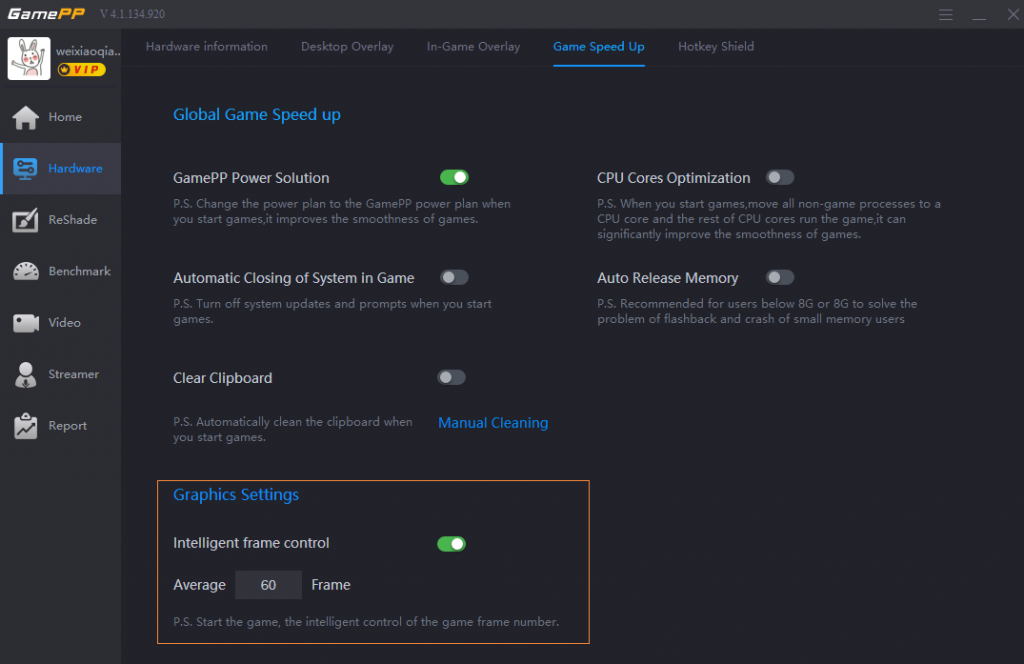
Open the GamePP, select the hardware monitoring game acceleration section, you can see the graphics settings below, customize the average number of game frames, open the smart frame number control switch and start the game after starting, you can intelligently control the number of game frames.
 How to open the GamePP power solution?
 3,578
How do I check the configuration and computer model of my computer?
3,394
How to check the CPU temperature and GPU temperature of the computer in the game?
3,901
How to check the CPU and GPU temperature on the desktop?
3,265
How do I view the hardware information of my computer?
2,826
How to lock the number of frames in the game?
3,066
How does the GamePP display the number of game frames for “PLAYERUNKNOWN’S BATTLEGROUNDS&...
3,499
Game Plus Plus will lower the volu...
10,727
Using Game Plus Plus while playing...
5,328
How to open the ReShade solution?
5,135
Sometime Game Plus Plus cannot nor...
3,943
Game Plus Plus can no work properl...
3,927
How to check the CPU temperature a...
3,901
Game Plus Plus can no work properl...
3,845
Select to enable the desktop overl...
3,752
How to switch the reshade patch in...
3,612
How to open the GamePP power solut...
3,578
3,578
How do I check the configuration and computer model of my computer?
3,394
How to check the CPU temperature and GPU temperature of the computer in the game?
3,901
How to check the CPU and GPU temperature on the desktop?
3,265
How do I view the hardware information of my computer?
2,826
How to lock the number of frames in the game?
3,066
How does the GamePP display the number of game frames for “PLAYERUNKNOWN’S BATTLEGROUNDS&...
3,499
Game Plus Plus will lower the volu...
10,727
Using Game Plus Plus while playing...
5,328
How to open the ReShade solution?
5,135
Sometime Game Plus Plus cannot nor...
3,943
Game Plus Plus can no work properl...
3,927
How to check the CPU temperature a...
3,901
Game Plus Plus can no work properl...
3,845
Select to enable the desktop overl...
3,752
How to switch the reshade patch in...
3,612
How to open the GamePP power solut...
3,578

wonderinfinity Copyright 2013-2026 wonderinfinity.com All rights reserved. wonderinfinity All Rights Reserved 蜀ICP备15019947号-1