Knowledge Base
 Search
CreatedOct 10,2019|AuthorGamePP|Categoryreshade Related questions
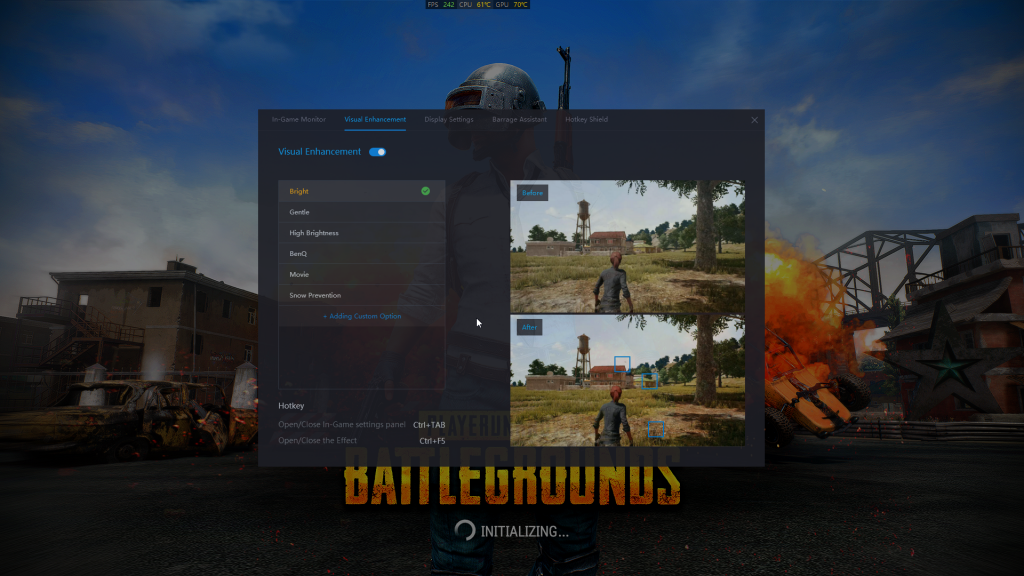
Open the GamePP, select the ReShade section, you can see that there is a hotkey module below, the default on/off in-game setting panel hotkey is the key, press "ctrl" + "tab" in the game, in the game Call out the settings panel, and then click on the reshade to switch between games.
 Game Plus Plus will lower the volu...
 11,658
Using Game Plus Plus while playing...
5,967
How to open the ReShade solution?
5,550
Sometime Game Plus Plus cannot nor...
4,436
How to check the CPU temperature a...
4,352
Game Plus Plus can no work properl...
4,256
Game Plus Plus can no work properl...
4,177
How does the GamePP display the nu...
4,128
How do I check the configuration a...
4,125
How to open the GamePP power solut...
4,006
11,658
Using Game Plus Plus while playing...
5,967
How to open the ReShade solution?
5,550
Sometime Game Plus Plus cannot nor...
4,436
How to check the CPU temperature a...
4,352
Game Plus Plus can no work properl...
4,256
Game Plus Plus can no work properl...
4,177
How does the GamePP display the nu...
4,128
How do I check the configuration a...
4,125
How to open the GamePP power solut...
4,006

wonderinfinity Copyright 2013-2026 wonderinfinity.com All rights reserved. wonderinfinity All Rights Reserved 蜀ICP备15019947号-1